Click on a component to enter its archive
This site provides information about my software of the pre-internet era, now all archived.
The Archives
- The LOS Archive
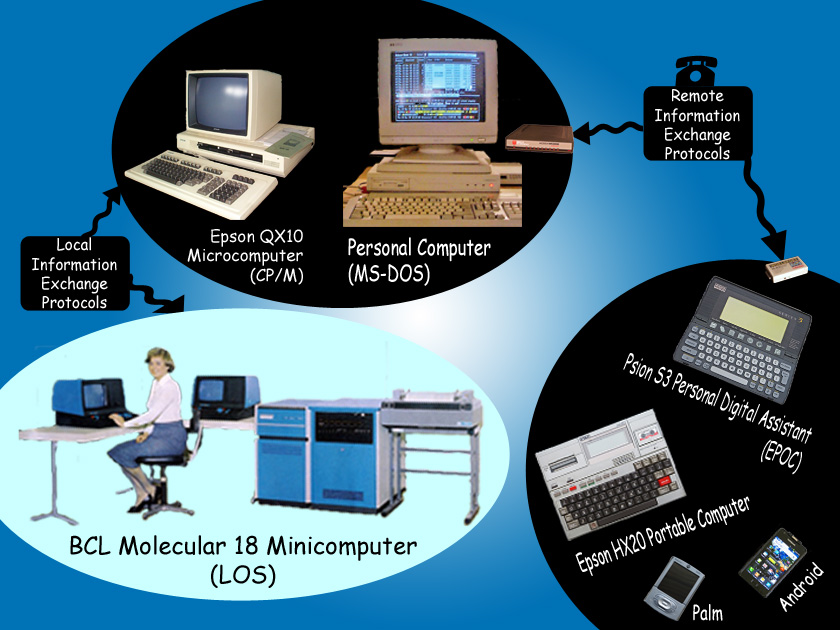
- In the 1970's many moderate sized organisations acquired a single central "minicomputer" into which multiple "dumb"
terminals, printers and disc storage devices could be directly wired. Although
ASCII had become the standard character encoding between components
and there was a rather loose adherence to RS232 for serial communication,
each computer manufacturer provided their own proprietary software to run applications and "drive" compatible peripheral
devices.
- The LOS Archive takes a look at the
BCL Molecular 18 Minicomputer running the multi-user "Leicester
Operating System". The "Molly" was in commercial use in the United Kingdom from 1972 to 1999 and found a niche notably amongst
wholesale distributors who appreciated the fast response of its applications
software written entirely in Machine Code.
- The HX20 Archive and The QX10 Archive
- By the 1980's stand-alone desktop "microcomputers", generally incorporating floppy diskette drives and running the
single-tasking CP/M operating system, had become common business
equipment. It was also practical, within an ordinary dialed telephone call, to connect remote devices through acoustic couplers
or (preferably!) modems, albeit at 30 characters per second through noisy mechanical telephone exchanges.
- Pharmaceutical wholesalers, with a long tradition of prompt delivery, were particularly keen to offer their customers the option
to submit their often lengthy orders electronically. In 1983 the
Epson HX20, a self-contained A4-size computer which could
be squeezed into the smallest pharmacy, became widely available. Wholesalers could now offer their customers a completely
electronic order service.
- The HX20 Archive presents the User Guide to my HX20 application for bulk electronic
ordering from pharmaceutical wholesalers. The application source code is also included in the archive. This application was in commercial
use in the UK from 1984 to 2001 and an
adapted version was used
by one company's salesmen to take orders whilst visiting clients.
- At the wholesalers' premises, a number of factors determined that electronic orders should be handled by a "front-end"
microcomputer replacing one of the minicomputer's terminals. The QX10 Archive presents the
source code of my original electronic order entry front-end software for pharmaceutical wholesalers as implemented on the
Epson QX10. An
adapted
version was used by Staples Chemists where, in the dead of the night, a QX10 at head office would auto-dial and exchange data
with early (1985) EPOS tills installed in their shops around
Stoke on Trent.
- The QX10 front-end software was written in 8080 Assembler with the Peachtext word processor and assembled with CP/M's ASM.COM,
both provided with the QX10. The multi-tasking implementation interfaced directly with the QX10 hardware, entirely bypassing the
built-in CP/M operating system, thus enabling concurrent communication with the wholesaler's central computer and with the remote
customer's equipment (through separate RS232 serial ports).
- The MS-DOS Archive
- In the 1980s hardware evolution deserted the microcomputer (with its myriad of incompatible diskette data formats) in favour
of "compatibility" to the IBM "Personal Computer". Although the installed QX10s continued running trouble free
for year after year, by 1989 I had transferred all development of the front-end software to MS-DOS on the PC. The
MS-DOS Archive presents my User Guide to this software, which remained in commercial use
in the UK until 2013.
- The MS-DOS front-end software was written in x86 Assembler with Microsoft Word and assembled with Microsoft's MASM 6.11 Assembler.
The implementation, derived from that on the QX10, was now more formally structured into an
operating system providing multi-tasking and other primitive services on top of the single-tasking MS-DOS services to the three
available optional applications: Terminal Emulation, Electronic Order Entry and Document Archiving.
- The implementation represents something of a compromise from the multi-tasking viewpoint, as MS-DOS services were used to access
all devices other than the screen, the keyboard and the serial and parallel ports. However, hardware advances ensured that the delay
incurred while waiting for MS-DOS to execute, say, a hard disc access was normally imperceptible to the user. Furthermore, MS-DOS's
innovative concept of the "installable device driver" transferred driver development from the operating system to the
device manufacturers, enabling a multitude of new devices to be readily incorporated into existing systems.
- The Information Exchange Protocol Archive
- A "handbook" specifying the rules underlying data exchange with my front-end software; this web-based resource acted
as a reference for developers (mostly active during the 1990s). There are two sections: Server side for local information
exchange with the wholesalers' minicomputer and Client side for information exchange with (usually remote) customers' platforms.
- At the physical level all data exchanges took place via RS232 serial cables (with modems interfacing the
POTS where necessary).
- The Psion Archive
- The
Psion Series 3 (and Series 3a) enjoyed a brief but happy life as a "Personal Digital Assistant" in the mid 1990's.
- The Psion Archive presents the User Guide to my Psion Series 3 application offering
bulk electronic ordering from pharmaceutical wholesalers and was in commercial use in the UK from 1993 for a brief period. The source
code is also included in the archive.
- The Palm Archive and The Android Archive
- A digression into smartphone application development, presenting the User Guides to my 2003 Palm application for settling-up shared
expenses, and its 2012 Android successor.
First Steps
- Royal Barlock Typewriter
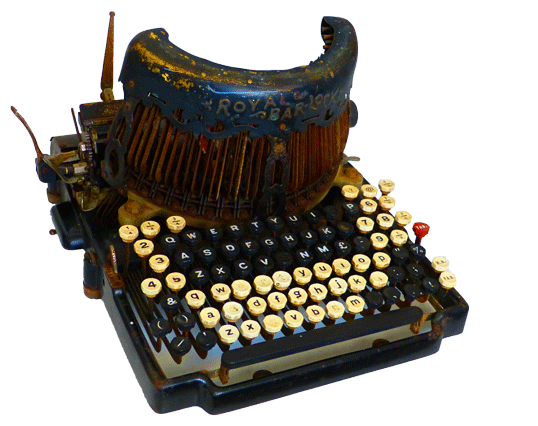 Manufactured
in about 1906,
a gift from my parents in about 1955. A lever to the
left of the keyboard selects red or black ink from a standard typewriter
ribbon. I usually used red because my machine never ran very
well in black (sample)! Lower case "l" serves as the digit "1" and
upper case "O" as the digit "0".
Manufactured
in about 1906,
a gift from my parents in about 1955. A lever to the
left of the keyboard selects red or black ink from a standard typewriter
ribbon. I usually used red because my machine never ran very
well in black (sample)! Lower case "l" serves as the digit "1" and
upper case "O" as the digit "0".- Imperial Messenger Typewriter
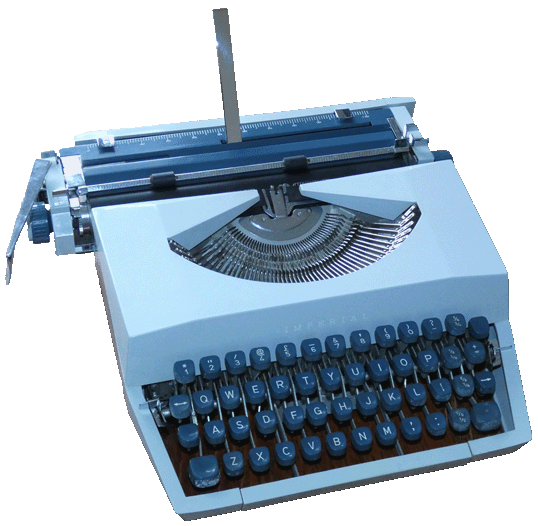 Manufactured
in 1964, a gift from my parents in 1964. Supplied with one typeface from a comprehensive range,
this typewriter came with a sturdy carrying case making it easily portable.
Also included were
operating instructions and a
beginner's guide to typing.
Manufactured
in 1964, a gift from my parents in 1964. Supplied with one typeface from a comprehensive range,
this typewriter came with a sturdy carrying case making it easily portable.
Also included were
operating instructions and a
beginner's guide to typing.- This typewriter provided all my personal requirements until superseded
by word processing software in the mid
1980s.
- Elliott 803 Computer
 My
first encounter with an electronic computer was the Elliott 803
at Durham University in the summer of 1966,
following my second year exams. In that year the computer department ran an introductory course in the Algol 60 programming language
for anyone interested. In my third year
at Durham I often took advantage of time on the 803 set aside for
anyone on a first-come first-served basis; those turning up would help each other operate
the machine and the department staff were available if needed. My first
program, written in Algol 60, calculates the position of the Sun using the formula given in the explanation to The Nautical Almanac, which I
could compare with that printed in The Nautical Almanac as both publications
were available in the university's library:
Sun's Position
(1967 final version).
My
first encounter with an electronic computer was the Elliott 803
at Durham University in the summer of 1966,
following my second year exams. In that year the computer department ran an introductory course in the Algol 60 programming language
for anyone interested. In my third year
at Durham I often took advantage of time on the 803 set aside for
anyone on a first-come first-served basis; those turning up would help each other operate
the machine and the department staff were available if needed. My first
program, written in Algol 60, calculates the position of the Sun using the formula given in the explanation to The Nautical Almanac, which I
could compare with that printed in The Nautical Almanac as both publications
were available in the university's library:
Sun's Position
(1967 final version).- Input to the 803 was via a paper tape reader and output via a paper tape punch with
a single teleprinter for typed program output and system messages (no
keyboards or screens!). An operator's console comprising some groups of
buttons and a solitary knob provided manual control. The knob controlled the volume of
the loudspeaker; apparently you could tell what instruction the computer was
working on by the sound from the loudspeaker.
- Stand-alone teleprinters (probably Teletype Model 33 ASR) within the department allowed
users to prepare 8-track input tapes off-line. Many iterations of this tape
must have been required over several weeks to get my program's final version
through the Algol 60 compiler without error! Immediate typing errors could
be eliminated by pressing back-space followed by rubout (which punched out
all eight tracks) and hand-held devices could assist with cutting, splicing
and punching the tape, but most text editing involved punching a new tape
(offline at one of the stand-alone teleprinters) by copying the old automatically up
to each point at which editing was required. The new tape could then be fed
to the Algol 60 compiler running on the 803 which, if all went well, punched
out the machine code onto 5-track paper tape ready to be loaded into the 803
and run. Old tapes could be recycled as decoration material.